
Aurich Lawson
Your keyboard is the thread that connects you to your computer. The way a keyboard feels—from the sensations of each key pressing down and resetting to the build of the board’s chassis—has a direct impact on your typing experience, affecting accuracy, speed, and fatigue.
We’ve dug into the joys of quality keyboards and the thrills of customization at Ars Technica before. But what really makes one type of keyboard feel better than another? People say membrane keyboards feel mushy, but why? And what about keyboards with cult-like followings? What makes decades-old IBM keyboards or expensive Topres so special?
In this guide, we’ll look at how some of the most popular keyboard categories work and how their differences impact typing feel.
Mechanical keyboards
Many people consider mechanical keyboards to be the king of keyboards. Mechanical keyboards are generally very tactile, as their keys offer distinct feedback with each press. Customization options that impact feel, appearance, and sound mean that mechanical keyboards are also great for users who want to tweak individual parts to get the precise feel they’re looking for.
So why do they feel so good to type on? Let’s take a look.
The switch under each mechanical keyboard key has more components, moving parts, and travel compared to a membrane keyboard, making button presses feel more substantial. Pressing a mechanical switch sends its plastic stem downward, while the spring provides resistance. As the plastic stem moves downward, it allows the switch’s two metal leaves to make physical contact, closing a circuit and sending a signal to the keyboard’s printed circuit board, or PCB. (Check out this article from Kinetic Labs for an overview of the basics of mechanical keyboard PCBs). Depending on the stem’s design, the keypress might go down smoothly (in linear switches), with a discernible bump along the way (tactile switches), or with a bump and a click sound (clicky switches).
-
A profile view of a Cherry MX Red mechanical switch.
-
An exploded view of a Cherry MX Brown switch.
-
A depiction of an MX Red in its static position.
Cherry -
A depiction of a depressed MX Red switch.
Cherry
When the button is released, the spring creates feedback while the key resets, during which the plastic slider comes back up vertically and separates the switch’s metal leaves again.
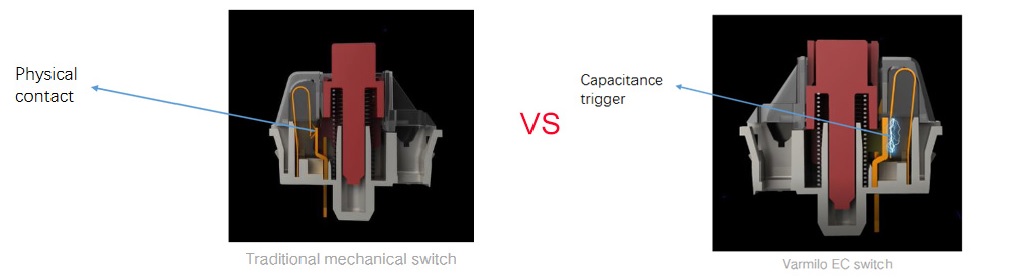
That’s how mechanical switches usually work, but some modern examples tweak that formula, such as optical switches (which actuate depending on if the switch’s stem travels through a light beam) and Hall effect switches. Additionally, Varmilo produces switches that work like a standard mechanical switch, but instead of actuating via metal contact points touching, the metal points just come very close to each other during keystrokes. This changes the electrostatic capacitance of the electric field between the two contacts, resulting in input (these electrostatic capacitive switches work differently from Topres, which we’ll get into later).
Mechanical keyboards also provide customization options that make it easier to fine-tune the typing experience. Mechanical keyboard customization options include switch type, keycap sizes, shapes, and material; different types of cases, gaskets, and plate mounting styles; and applications of foam, lube, and stabilizers. Conventional membrane keyboards don’t allow for this kind of personalization.
Some people also find that the feedback and travel of mechanical keys help with the physical discomfort associated with frequent typing. And while companies often market the short key travel of scissor switches as a way to type faster, mechanical switches can also help with speed and accuracy because of their distinct keys and tactility. (We’ll look at scissor switch keyboards in a bit.) Further, some mechanical switches require little force and/or travel to actuate, which can also help with speed and the amount of energy exerted while typing.