
Skip to content
Alcuse.com
Menu
  • Home
  • Arts Entertainments
  • Auto
  • Business
  • Cryptocurrency
  • Digital Marketing
  • Education
  • Finance
  • Gaming
  • Health Fitness
  • Home Kitchen
  • Legal Law
  • Lifestyle Fashion
  • Medicine
  • Pets
  • Real Estate
  • Relationship
  • Shopping Product Reviews
  • Sports
  • Technology
  • Tours Travel
  • Privacy Policy
  • Contact US
  • Sitemap
Menu

‘Allow Us To Use…’: Many Instagram Users Stranded On Home Screen | What’s Happening & A Quick Fix

Posted on April 7, 2025

Last Updated:April 05, 2025, 10:26 IST

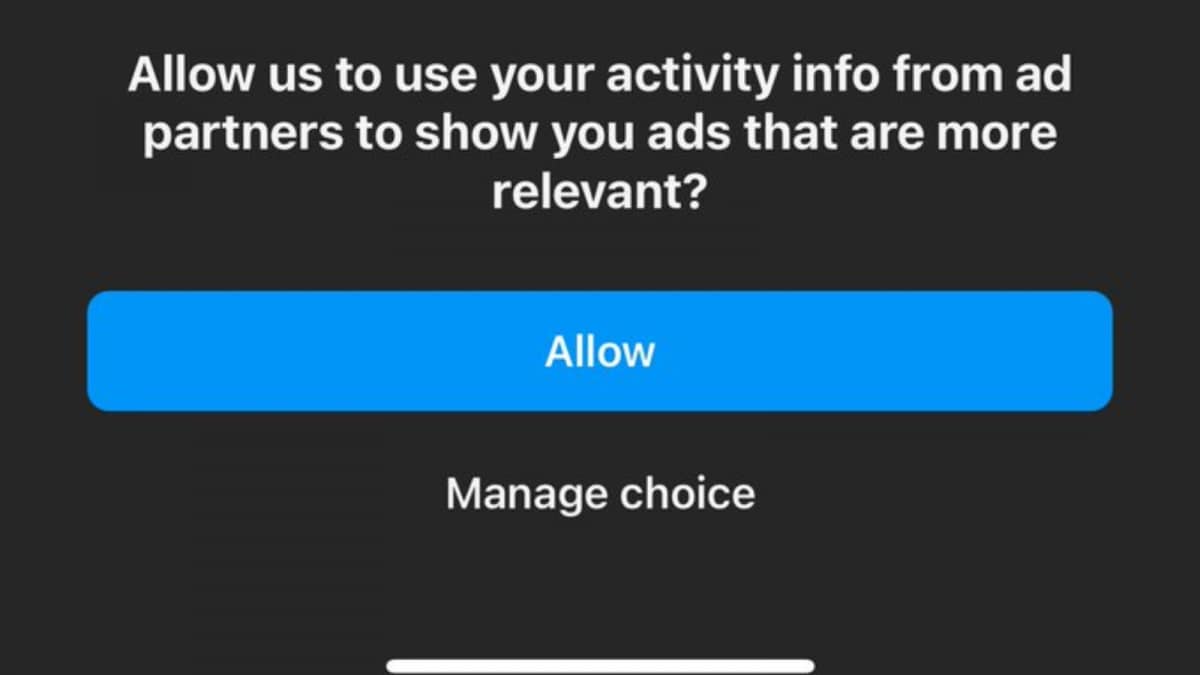
The Instagram issue began with a message at the top of the screen that read, “You have a say in ads you see.”

Things went awry when users tried to close the message. (Photo: X/@ardipulaj)

Instagram users across the globe were left frustrated after a recent update triggered a glitch that made the platform nearly unusable. The issue began when a message popped up asking users to change their ad settings — but the prompt couldn’t be closed, leaving many stuck on the home screen and unable to access the app as usual. This glitch follows a series of experimental changes by the Meta-owned app, including tweaks to photo grid sizes and story placements. Despite widespread complaints, Meta is yet to issue an official response or explanation.

The issue began with a banner at the top of the screen that read, “You have a say in ads you see,” intended to help users customise their ad preferences. However, things went awry when users tried to close the message — many found themselves unable to return to the main interface, getting stuck on the home screen and effectively locked out of the app’s usual functions.

A user complaining about the issue on X (Formerly known as Twitter) wrote, “What is going on with Meta? I have a say in the ads on Instagram and I cannot choose to not allow Meta to see my activity? If I press MANAGE Choices and do not allow it, this shows up again and again and again Instagram Meta I don’t want to allow it, please make it possible.”

Here are a few easy things you can do to fix the Instagram glitch:

Close and Reopen the App – Fully shut down Instagram by removing it from your recent apps, then relaunch it. This often resolves minor bugs.

Change Ad Settings – Go to your profile and tap the three lines. Open Settings and Privacy, then go to Accounts Center, Ad Preferences, and Ad Settings. Under Activity information from ad partners, tap Review setting, select “No, don’t make my ads more relevant,” then save and check if the pop-up disappears.

Use a Browser Instead of the App – Open Instagram in Chrome, Safari or any browser. Go to Settings, Accounts Center, Ad Preferences and Turn off personalised ads. Log out and try using the app again.

Clear App Cache – Android users can go to Settings, Apps, Instagram, Storage and Clear Cache. If you’re an iPhone user, you’ll need to uninstall the app, and then reinstall it.

Update the App – Head to the App Store or Google Play Store, check for updates, and install if available.

Uninstall and Reinstall – Delete the app completely, restart your phone, and then reinstall Instagram. This resets the app and may resolve the issue.

News tech ‘Allow Us To Use…’: Many Instagram Users Stranded On Home Screen | What’s Happening & A Quick Fix

Leave a Reply Cancel reply

Your email address will not be published. Required fields are marked *

Recent Posts

  • What should I expect from a Sexual harassment lawyer consultation?
  • What are the benefits of software composition analysis tools?
  • What is natural justice in unjust dismissal Canada?
  • Can users find factories on global sources website?
  • 구글 검색 누락 카페24도 생기나요?
  • 음식은 강남달토에서 빨리 나오는 편이야?
  • 강남 가라오케 중심가예요?
  • 강남호빠는 처음 가는 사람에게 추천되나요?
  • What questions should I ask an employment lawyer Toronto?
  • Can the TikTok API improve content strategy?
  • Is commercial energy management worth the investment in Bermuda Dunes CA?
  • Decen Masters: Crowdsourcing Alpha in an Automated World
  • Can a Locksmith near me install window security locks?
  • What is the cost of gutters installation?
  • Does termination pay apply to executive-level employees?
  • 해외스포츠중계는 스마트 TV에서 볼 수 있나요?
  • 무료 스포츠중계 사이트 오류 잦나요?
  • 오피 계약 해지 시 중개수수료는 어떻게 되나요?
  • Is transportation included with a Curacao jetski tour?
  • How is the EV charging industry supporting fleet electrification?

Archives

  • July 2026
  • May 2026
  • April 2026
  • March 2026
  • January 2026
  • December 2025
  • November 2025
  • October 2025
  • September 2025
  • August 2025
  • July 2025
  • June 2025
  • May 2025
  • April 2025
  • March 2025
  • February 2025
  • January 2025
  • December 2024
  • November 2024
  • October 2024
  • September 2024
  • August 2024
  • July 2024
  • June 2024
  • May 2024
  • April 2024
  • March 2024
  • February 2024
  • January 2024
  • December 2023
  • November 2023
  • October 2023

Categories

  • Arts Entertainments
  • Auto
  • Business
  • Cryptocurrency
  • Digital Marketing
  • Education
  • Finance
  • Gaming
  • Health Fitness
  • Home Kitchen
  • Legal Law
  • Lifestyle Fashion
  • Medicine
  • Pets
  • Real Estate
  • Relationship
  • Shopping Product Reviews
  • Sports
  • Technology
  • Tours Travel
Slot gacor hari ini
Slot online
TOTO SLOT
Slot
©2026 Alcuse.com | Design: Newspaperly WordPress Theme